What happens behind the scenes while your event is running
The busiest moment of your festival is also the moment your network is under the most strain. Everyone pays at the same time, streams at the same time, posts at the same time. That’s exactly when you want to be sure everything keeps running. And if something does give out, you want us to already be fixing it before you notice.
That’s the idea behind Stardex, our own monitoring platform. While your event is running, we watch every device we’ve set up on your site, live.
Multiple brands, multiple platforms, one problem
A temporary event network never consists of a single brand. At an average venue you quickly end up with Ubiquiti WiFi access points and switches, a Peplink or Teltonika 4G/5G router, a Starlink dish for the internet connection and a few EcoFlow batteries to power it all. All different manufacturers, each with their own platform, their own dashboard, their own cloud.
During a live event, you don’t want to be clicking through five different platforms to find out whether everything is still online. That’s exactly where it goes wrong: one app says the WiFi is running, another says the Starlink is drawing power, and nowhere do you see the whole picture.
Stardex pulls those worlds together on one screen. UniFi, Peplink, Teltonika, Starlink and EcoFlow, side by side, in the same view. At a glance you can see whether each device is online, how much bandwidth is flowing, whether an internet line has dropped and whether a battery is starting to run low.
Organised the way an event works
Most monitoring tools assume your network sits in a fixed place and stays there. For us, that’s never the case. Every job is a different location, different devices, a different setup. Build up, run, tear down.
That’s why Stardex groups everything by event, not by network. For the duration of the job, we link each device to a project. That way, during the event you see the full overview of that location, and afterwards you can look back at the data of every past event. How much data did the Starlink use that weekend? How often did the network switch to a backup line? It’s all there.
Measuring is knowing
A sample of what comes in:
- A sweep across a fleet of multiple UniFi devices at once, each with its status, consumption and number of connected visitors.
- A Starlink dish drawing around 27 to 34 watts at that moment and having used 72 GB in the current month.
- A network that automatically switches to its backup internet line as soon as the main line falters, with the failover visible in the overview.
These figures obviously vary per event; they’re a snapshot, not a fixed specification. But they do show what runs continuously in the background while you focus on your programme.
Solving a problem before it becomes one
Watching live has only one real purpose: stepping in before things go wrong. In Stardex we set up rules. Alert us when a device goes offline. When a battery drops below a certain level. When an internet line drops. Such an alert comes in almost instantly, and by then we’re often already working on a fix while nobody on site has noticed anything yet.
The platform also collects all system notifications from all devices in one place and sorts them by importance, so the real signals don’t drown in the noise. And because all data is retained, we can link it to reports: uptime per event, data usage, bandwidth, battery usage. Useful for us, and for you if you want to know exactly how your network performed.
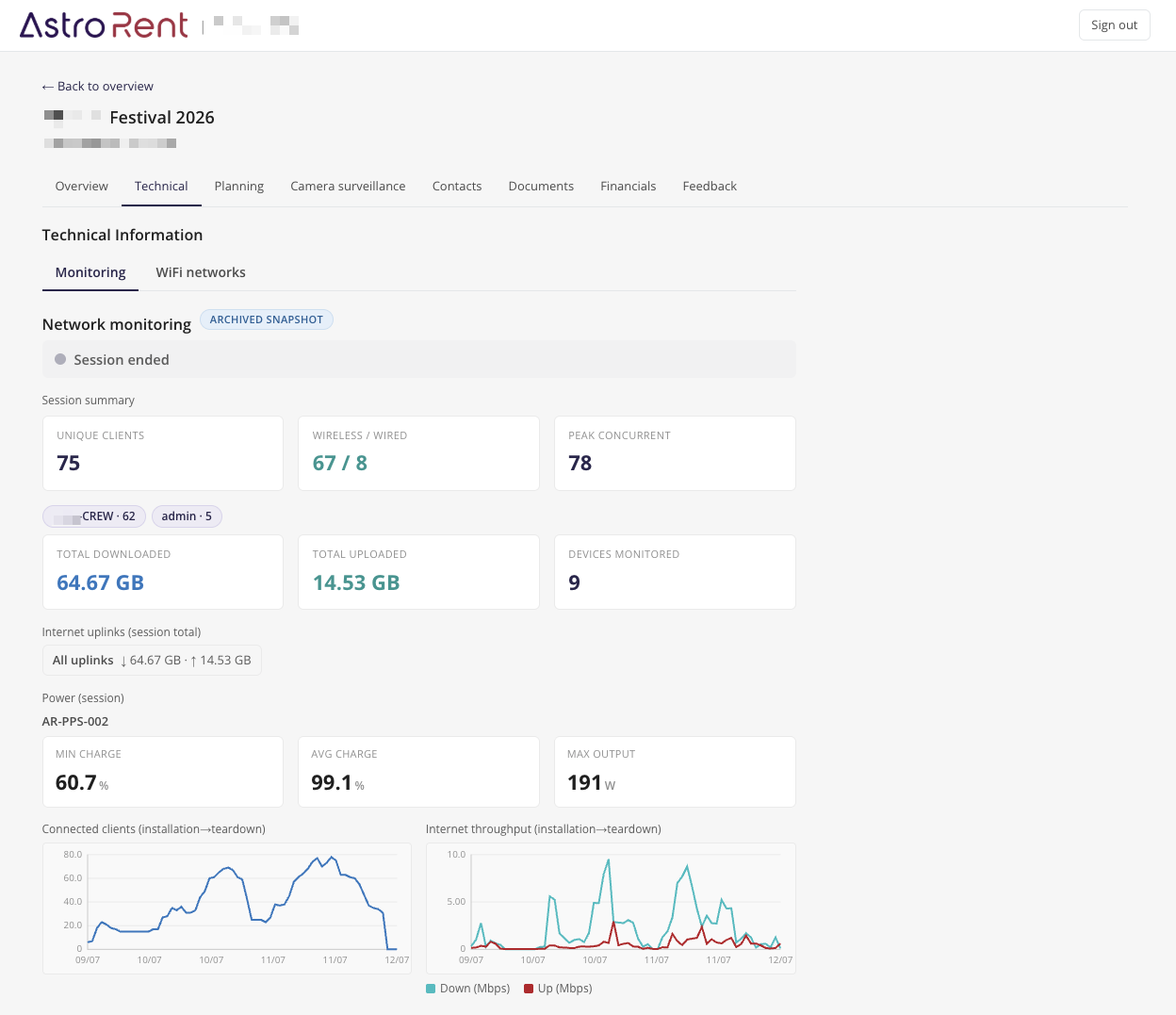
You can watch along
We keep an eye on the network, but that doesn’t mean you’re left in the dark. In your client portal you see the status of your own event: whether everything is running, how much data is flowing, how your network is holding up. Without having to dive into five different platforms or understand anything about the technology.
So the monitoring stays with us, but the overview is shared. Handy if you want to check in on how things stand, or look back afterwards at just how busy it was.
Why we built this ourselves
We could have stitched this together from separate apps and hoped for the best. But that misses the point. An event stands or falls with a network that holds up at the moment it counts, and that requires someone watching the whole thing, not five pieces separately.
So AstroRent doesn’t just install your network. We monitor it live, from build-up to tear-down, and solve problems before they hit your event. That’s ultimately what you’re paying for: not the cables and the boxes, but the peace of mind that it simply works.
Frequently asked questions
What is Stardex? Stardex is AstroRent’s monitoring platform. It shows all network and power equipment at an event live in a single view and alerts us as soon as something goes wrong.
Which equipment does Stardex monitor? Today the platform talks to several hardware ecosystems: Ubiquiti/UniFi (WiFi and switches), Peplink and Teltonika (4G/5G routers), Starlink (satellite internet) and EcoFlow (battery and power stations). Among other things, it measures online status, bandwidth, signal, number of connected visitors, battery level and power consumption.
What do I get out of monitoring as an organiser? Your network is monitored live instead of merely installed. If an internet line drops or a battery runs low, we often see it before you or your visitors notice anything, and we step in.
Can I see how my network is doing myself? Yes. Through your client portal you can follow the status of your event: whether everything is online, how much data is flowing, how the network is holding up. Active monitoring and intervention remain our job, but you have the overview at hand, during and after the event.